
See What's really happening — across one site, or your whole portfolio

Inventory and transaction data piles up across every machine, crib, and site — but on its own, that data doesn't tell you anything. Spotting a trend, a slow-moving item, or an unusual pattern means pulling reports, building spreadsheets, and comparing numbers by hand. For a distributor managing many customer accounts, that same problem repeats at every single site, multiplied across a whole portfolio.

SupplyPointiQ Analytics Monitor

What SupplyPointiQ Is

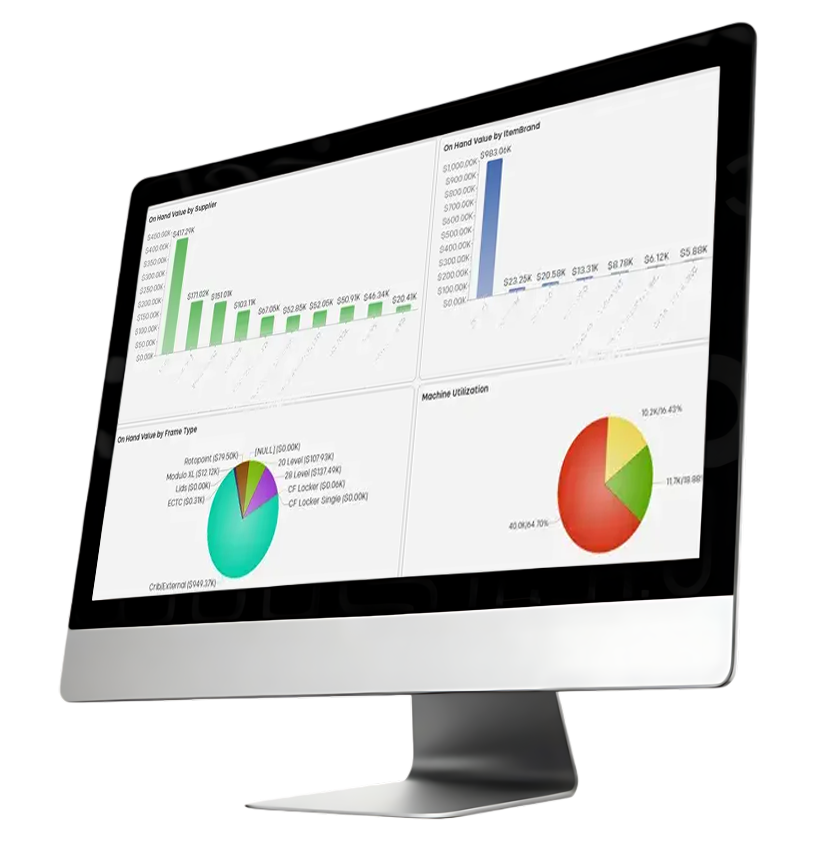
SupplyPointiQ is a visual analytics suite built directly into WebSync — not a separate login or system. It turns the data WebSync already collects into interactive dashboards: click on any chart and everything else on the screen recalculates around that selection, so exploring a question takes seconds, not a new report.

SupplyPointiQ is included with a WebSync subscription at no additional cost.

 

Two Views, Built for Two Audiences

Distributor-level — a rollup across every customer site a distributor manages, narrowable to a Customer Group or a single tenant


Tenant-level — a deep dive into a single customer's own machines and cribs

Both are built for the same underlying questions — what's on hand, what's moving, and where attention is needed — just at a different scale.

Still Evolving

SupplyPointiQ is under active development, with more capability planned. What's covered on this page reflects what's available today.

Capability Snapshot

Visual Dashboards
Click-to-Filter, Cross-highlight
Drill Down to Raw Data
Save & Revisit Filtered Views
Export to PNG or PowerPoint
Full-screen Slide-show Mode
Distributor Rollup or Single-site Focus
Included with WebSync
What it does
Inventory, consumption, and ordering data turned into charts, not spreadsheets
Select any chart element and every other section recalculates around it
Right-click into the exact transactions behind any chart ("Jump")
Keep a saved view of a filter you use often
One-click export of any dashboard
Present dashboards directly, tab by tab
View every managed customer at once, or narrow to one tenant
No separate license or fee
Why it matters
No more manual reporting just to know what's going on
Spot a pattern and see it from every angle, instantly — no rebuilding a report
Get to the root cause, not just the summary number
Skip rebuilding the same analysis every time
Ready to drop into a customer business review or internal report
Walk a customer through their own data live
One tool for a portfolio-wide review and a single-account deep dive
Removes any cost barrier to offering it as a value-added service
What it does
Why it matters
Visual Dashboards Inventory, consumption, and ordering data turned into charts, not spreadsheets No more manual reporting just to know what's going on
Click-to-Filter, Cross-highlight Select any chart element and every other section recalculates around it Spot a pattern and see it from every angle, instantly — no rebuilding a report
Drill Down to Raw Data Right-click into the exact transactions behind any chart ("Jump") Get to the root cause, not just the summary number
Save & Revisit Filtered Views Keep a saved view of a filter you use often Skip rebuilding the same analysis every time
Export to PNG or PowerPoint One-click export of any dashboard Ready to drop into a customer business review or internal report
Full-screen Slide-show Mode Present dashboards directly, tab by tab Walk a customer through their own data live
Distributor Rollup or Single-site Focus View every managed customer at once, or narrow to one tenant One tool for a portfolio-wide review and a single-account deep dive
Included with WebSync No separate license or fee Removes any cost barrier to offering it as a value-added service

Distributor-Level Analytics

For a distributor managing many customer sites, SupplyPointiQ turns a portfolio of scattered accounts into one picture — where value is concentrated, which suppliers matter most, where machines are underused, and which customers need attention. Filter to a Customer Group or a single tenant at any point without losing the bigger picture.

Overview — How healthy is my whole portfolio, right now?

  • Total on-hand and on-order value across every managed customer, at a glance
  • Fleet composition by hardware type, across your entire installed base
  • Stock health (healthy / low / out-of-stock) — a leading indicator of ordering or capacity problems before they become stockouts
  • Week-over-week ordering trends, to spot a slowdown or spike across your whole book of business
  • Top 10 customers by stock value, to see where the concentration of value sits

Inventory — Which suppliers and brands matter most, and where is capacity wasted?

  • On-hand value ranked by supplier — useful for understanding exposure if a supplier relationship changes
  • On-hand value ranked by brand
  • On-hand value by hardware type, showing your most-used equipment types
  • Machine utilization — in-use versus unassigned locations across every customer, to find wasted capacity

Usage — Where is activity happening, and where isn't it?

  • Top customers and suppliers by consumption
  • Slow-moving item breakdown, to free up space being wasted on items nobody's using
  • Daily and weekly transaction trends, to catch anomalies — a sudden slowdown, a spike, a seasonal pattern — early

Tenant-Level Analytics

For a single customer site, SupplyPointiQ answers the questions that matter to that operation specifically — what's on hand, what's moving, who's using it, and where.

Stock Summary — How much inventory do I have, and is it healthy?

  • Total on-hand and on-order value across every managed customer, at a glance
  • Fleet composition by hardware type, across your entire installed base
  • Stock health (healthy / low / out-of-stock) — a leading indicator of ordering or capacity problems before they become stockouts
  • Week-over-week ordering trends, to spot a slowdown or spike across your whole book of business
  • Top 10 customers by stock value, to see where the concentration of value sits

Stock Detail — How is my equipment being used?

  • Breakdown of installed hardware by type
  • Machine utilization by individual unit, to spot where capacity is sitting unused

Usage Summary — Who's using what, and is anything unusual?

  • Weekly transaction volume and value trends
  • Top items and suppliers by cost
  • Transaction value by user — unusually high activity from a single user is worth a second look, and this view surfaces it directly

Usage — What's not moving, and where's consumption headed?

  • A list of slow-moving items with their last transaction date, to identify space that could be put to better use
  • Consumption by item group
  • Six-month consumption trend

Working With SupplyPointiQ

Drill Down

Drill down into any chart to see the exact underlying transactions behind it

Saved Views

Save a frequently-used filtered view to revisit later, instead of rebuilding it each time

Export

Export any dashboard to PNG or PowerPoint — handy for a customer business review or an internal report

Slide Show

Present dashboards full-screen, moving through tabs like a slideshow

Related Solutions and Content

Total Inventory Control

Ready to see SupplyPointiQ in Action?

Request a demo or find an authorised SupplyPoint distributor near you.